On-call paging · Incident response

Wake the right person. Resolve what matters.

OpsPing is the paging and incident-response platform for engineering teams that need alerts to cut through, coverage to stay clear, and migrations to stay boring.

iOS Critical Alerts Android DND bypass GenieKey compatible
app.opsping.com/alerts
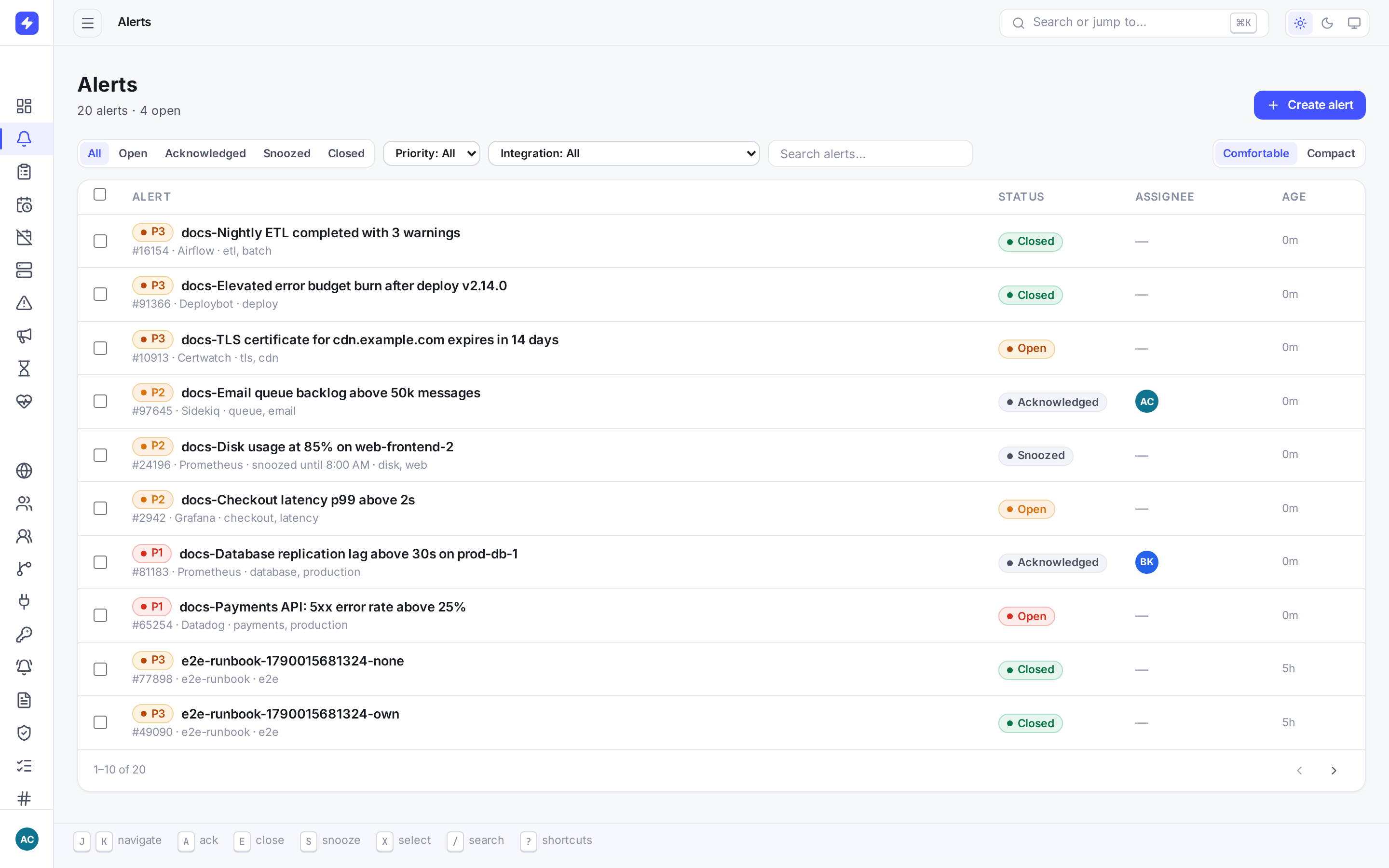
OpsPing alert list showing active alerts, severities, ownership, and operational status
Leave the rewrite behind

Change the endpoint, not your alerting stack.

OpsPing accepts familiar Opsgenie alert payloads and GenieKey authorization. Keep the alert integrations that use the supported Opsgenie alert API — change the endpoint and key, verify each one, and move schedules, teams, and policies on your timeline.

Keep: alert fields, aliases, priorities, tags, and the GenieKey header shape. Remap responders to OpsPing users and IDs.
Repoint: Alertmanager, Grafana, Prometheus, Datadog, Zabbix, CloudWatch, and custom webhooks — see the integration guides.
Configure once: users, schedules, escalation policies, and notification rules.
Read the migration guide →

OpsPing vs Opsgenie · Opsgenie end of support · Shutdown timeline · Opsgenie alternatives · Step-by-step switch · API compatibility · Cost calculator

vs PagerDuty · vs incident.io · vs Better Stack · vs Jira Service Management · Zabbix · Google Cloud Monitoring · Uptime Kuma · Elastic/Kibana · CloudWatch SNS

alertmanager.yml
# before — Opsgenie
receivers:
  - name: paging
    opsgenie_configs:
      - api_url: https://api.opsgenie.com/
        api_key: <opsgenie-api-key>
---
# after — OpsPing
receivers:
  - name: paging
    opsgenie_configs:
      - api_url: https://api.opsping.com/
        api_key: <new-opsping-api-key>
# Alertmanager appends v2/alerts to api_url.
# Create a new OpsPing key; the old key will not work.
One operational workflow

From first page to final review.

Three jobs have to work under pressure: reach the responder, coordinate the response, and learn from what happened. OpsPing keeps them connected.

01 · PAGE

Keep paging until someone owns the problem.

P1 alerts can cut through silent mode and Do Not Disturb. Reping continues until acknowledgement; escalation and voice provide another path when the first responder does not answer.

OpsPing mobile P1 alert with context, timeline, and response actions
02 · COORDINATE

Know who is responsible before the alert fires.

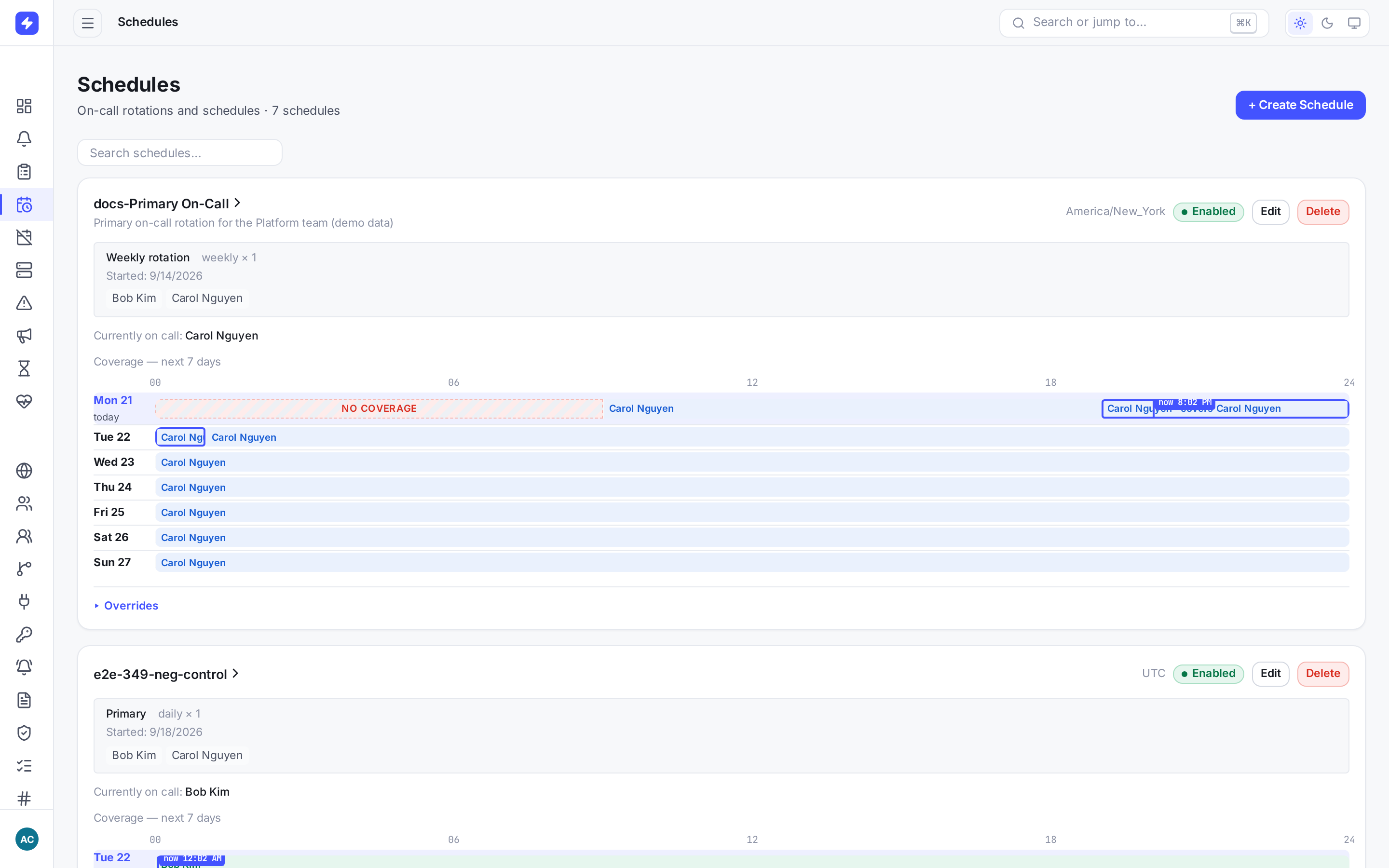
Schedules make current and upcoming coverage visible. During an incident, responders, impacted services, linked alerts, updates, and operator notes share one audited timeline.

  • Timezone-aware rotations, follow-the-sun coverage, and overrides
  • Ordered escalation rules for people, teams, and schedules
  • Slack actions, status updates, and stakeholder announcements
Explore the product →
OpsPing schedules showing current coverage, rotation participants, and upcoming handoffs
03 · IMPROVE

Turn incident history into fewer pages next time.

Use the response timeline for the postmortem, then find noisy services, slow acknowledgements, and uneven after-hours load. Alert policies let teams suppress, delay, or reprioritize signals before they wake anyone.

  • Audit-backed postmortems and status-page history
  • MTTA, MTTR, alert volume, and on-call-hours reports
  • Ordered alert policies with a dry run against real history
See alert policies →
OpsPing incident postmortem built from the response timeline
Operational confidence

Evidence for the day you need it most.

Reliability claims should be qualified, access should be auditable, and the service should be transparent when it has a problem.

Measured ingest capacity

One process accepted a two-minute burst at 1,000 alerts per second on a dedicated 24-core silo, with zero dropped iterations or HTTP failures and 83 ms ingest p95.

Read the load-test details →

Zero standing support access

Customer data stays tenant-isolated. Temporary support access requires customer invitation and leaves an audit trail; there is no hidden administrator bypass into customer content.

Visit the Trust Center →

Public service status

Check current OpsPing service health, incident updates, security practices, and subprocessors without opening a support ticket.

View system status →
Straightforward pricing

Pay for the team, not every alert.

Push paging is unlimited on every plan. No per-alert charges. Unlimited stakeholders, free on every plan.

Compare all plan details → Estimate on-call cost →
Free
$0 / month

Push-only paging for one small team.

  • 5 responders
  • Unlimited stakeholders, free on every plan
  • 1 team, 1 schedule, 1 single-level escalation
  • 3 integrations and 30-day history
  • Documentation + best-effort email support
Business
$25 / responder / month

For larger organizations with compliance and control needs. $20/responder/month billed annually ($240/responder/year) — save 20%.

  • Self-serve up to 100 responders; above 100, contact us for an annual quote
  • Unlimited stakeholders, free on every plan
  • Audit logs and custom RBAC
  • First-human-response target: 4 support hours

Free paging is push-only. Paid calls and other non-push channels depend on actual provider availability; WhatsApp activation remains off. New tenants receive 14 days of full access followed by a seven-day grace period. Free limits then apply unless a paid plan is selected. Alert ingest and critical push paging continue. The Opsgenie importer dry run is free; applying a migration requires Team.

Support: support@opsping.com, Mon–Fri, 9 AM–5 PM Eastern (America/New_York, DST-aware), excluding observed U.S. federal holidays. Response targets count only support hours, beginning or resuming when coverage opens; they are not guaranteed response or resolution times, and automated receipts do not count. Free and trial/evaluation/PoC use receives documentation and best-effort email support, with no guaranteed response or resolution time unless applicable written terms expressly override. Continuous paging does not mean 24/7 human support.

The standard paid-plan availability SLA remains 99.5% monthly. Custom or stronger SLAs require a separate written agreement, not a Business subscription alone. Free and trial/evaluation/PoC use has no contractual availability SLA unless applicable written terms extend coverage. Support policy and existing commitments — updated November 6, 2026, not retroactively. Existing commitments and signed terms remain in effect; reductions require applicable notice and/or agreement.

Your on-call tool can change without changing everything around it.

Start with OpsPing