Device health
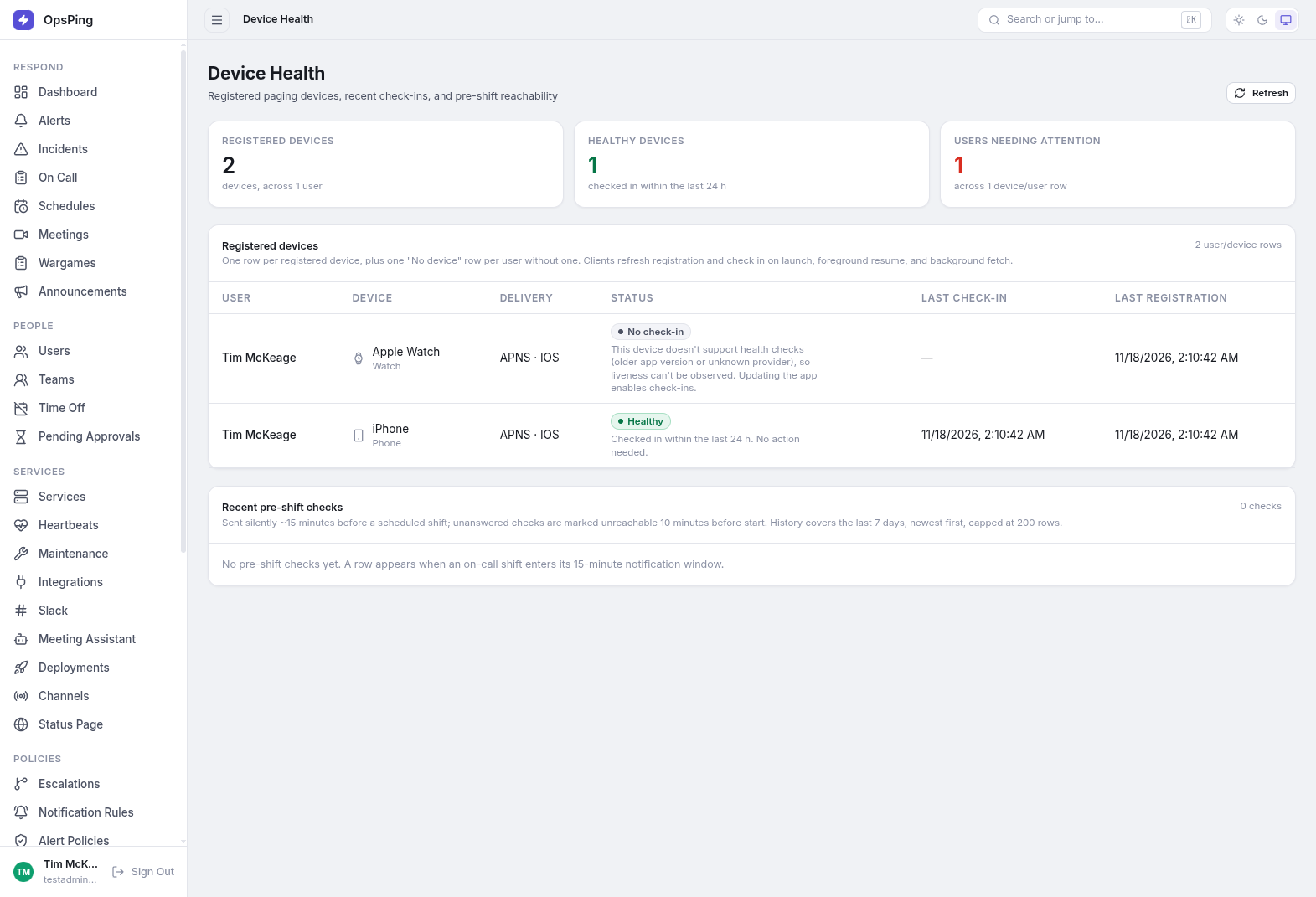
Paging only works if the devices are alive. Device Health ("Registered paging devices, recent check-ins, and pre-shift reachability") shows every registered phone and watch, when each last checked in, and who may be unreachable before their shift starts.
- Tenant access — Device Health is in the sidebar. The page auto-refreshes every 30 seconds; use Refresh to reload immediately.
- Devices get here by installing the mobile app and registering — see Mobile setup.
-
Read the summary cards
Three cards top the page:
- Registered devices — total devices, and how many users they span.
- Healthy devices — devices that checked in within the last 24 hours.
- Users needing attention — users with a device that isn't healthy (or no device at all).
-
Review the registered devices table
One row per registered device, plus one "No device" row per user without one. Clients refresh their registration and check in on app launch, foreground resume, and background fetch — so the timestamps reflect real app activity. Columns:
- User / Device — phone or watch, with its name.
- Delivery — push provider and platform, e.g.
APNS · IOSor FCM · Android. - Status — a badge with inline guidance:
- Healthy — checked in within the last 24 h. No action needed.
- Stale — no check-in for over 24 h. Open the app or check connectivity; push delivery may not be reaching the device.
- No check-in (unsupported) — the app version or provider doesn't support health checks, so liveness can't be observed. Updating the app enables check-ins.
- Waiting / unreachable / not-registered states cover devices that haven't completed registration or failed recent delivery.
- Last check-in / Last registration — timestamps, "—" when never.
NoteA device with no recent check-in may not receive pages. Push providers deliver to the last known state; a device that hasn't checked in for over 24 hours is a candidate for a stale-token miss. Have the user open the app — that alone refreshes registration. Delivery routes are covered in Notifications & channels.
-
Check pre-shift reachability
Recent pre-shift checks lists silent checks sent ~15 minutes before a scheduled on-call shift. A check the responder doesn't acknowledge is marked unreachable 10 minutes before the shift starts — a last-chance signal to fix the device (or reassign) before the page fires. History covers the last 7 days, newest first, capped at 200 rows.